

If you ask ten developers which platform they use, chances are most will say GitHub.
BUT… if you ask DevOps teams or large enterprises, GitLab is the obvious choice for them.
That’s why understanding GitLab vs GitHub matters, because it shapes how your team works every day.
Both platforms help you store code, collaborate with teams, and ship software. But they are built with very different philosophies. One focuses on community and collaboration. The other focuses on control and complete DevOps flow.
This guide breaks everything down in plain language.
What’s the fundamental difference between GitLab vs GitHub philosophies?
Before comparing features, you need to understand how these platforms think.
GitLab
GitLab is a web-based platform for storing and managing code, similar to GitHub, but with a broader focus. It is designed to handle the entire software development cycle in one place.
Because of this, the all-in-one approach of GitLab is commonly used by organizations that need strong process control and automation. It is especially useful for teams that want high security without relying on multiple disconnected tools.
GitLab helps teams manage:
- Source code and version control
- Automated testing and CI/CD pipelines
- Continuous deployment workflows
- Built-in security and compliance checks
- Project planning and tracking
GitHub

GitHub is a web-based platform designed to help developers store, manage, and collaborate on code using Git.
It was created to make teamwork in software development simple and efficient. At its core, GitHub focuses on collaboration, which is why it often feels like a social network for developers.
It’s popular because it’s easy to use and has a huge developer community. Many startups and individual developers use GitHub to build and share software.
GitHub is mainly used for:
- Storing code safely
- Working with teams
- Open-source projects
- Reviewing and approving code
Who’s Actually Using GitLab vs GitHub?

In real-world teams, the choice between GitHub and GitLab often comes down to how much structure and control a team needs.
GitHub is widely used by developers and teams that want to move fast and collaborate openly. It’s easy to start, simple to manage, and backed by a massive developer community.
This makes it ideal for startups, open-source projects, and teams that value speed, learning, and visibility.
GitLab, on the other hand, is preferred by organizations that need tighter control over how software is built and released.
It’s commonly used by larger companies, DevOps-driven teams, and regulated industries where security, approvals, and automation are critical. GitLab helps these teams keep everything under one system instead of juggling multiple tools.
| Area | GitHub | GitLab |
|---|---|---|
| Common Users | Individual developers, startups | Enterprises, DevOps-heavy teams |
| Team Size | Small to mid-size teams | Mid to large organizations |
| Main Focus | Collaboration and community | Control and automation |
| Best Suited For | Open-source and fast-moving | Regulated and process-driven environments |
| Tool Setup | Simple and quick | Structured and all-in-one |
This Quick table comparison will make it easier for you to see which platform matches your team’s working style.
How Do the Pricing Models Compare in GitLab vs GitHub?
Pricing can seem confusing, but it’s really about what you need and how much control you want.
GitLab Pricing
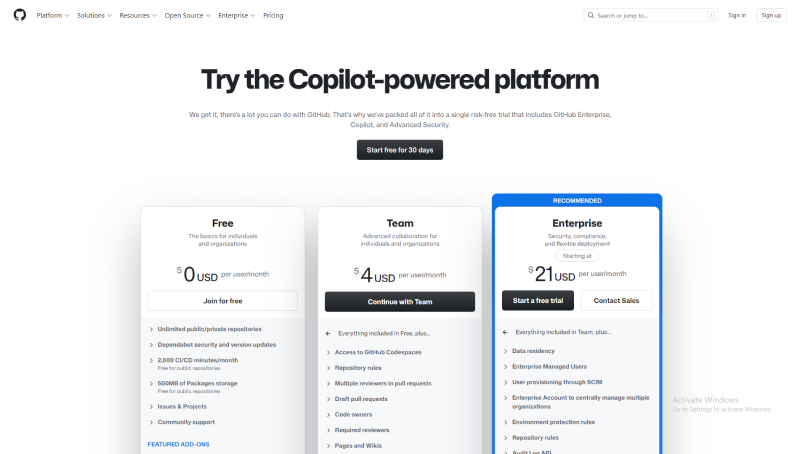
GitHub has a solid free plan that works well for:
- Personal projects
- Small teams
- Open-source work
Paid plans:
- Team Plan ($4/user/month): Adds code review tools, team management, and 3,000 CI/CD minutes per month.
- Enterprise Plan ($21/user/month): Advanced security, compliance, SSO, and 50,000 CI/CD minutes per month.
GitHub is great if you want to start simple and add features as your project grows.
GitHub Pricing
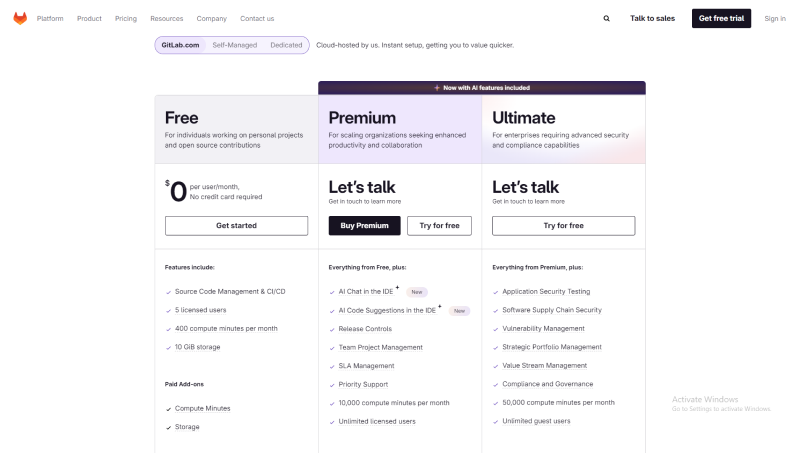
GitLab also offers a free plan, but it comes with more built-in tools from the start:
- CI/CD pipelines
- Basic security scans
- Project management tools
Paid plans:
- Premium ($19/user/month): Advanced CI/CD features, code analytics, team management, and faster support.
- Ultimate ($99/user/month): Deep security, compliance reports, portfolio management, and enterprise-level features.
If you plan to use DevOps and automation tools heavily, GitLab can be more cost-effective.
What are the practical Use Cases: When to choose GitLab vs GitHub
The real decision is not about features. It’s about how much structure your team needs while building and shipping software.
Choose GitHub:
Your team wants to start coding immediately without setting up complex workflows. You care more about shipping fast than managing detailed processes.
GitHub works well when:
- Developers want a clean and simple interface
- Collaboration happens through pull requests and reviews
- Open-source libraries and community feedback matter
- Teams experiment, iterate, and change direction often
Many startups and product teams choose GitHub because it stays out of the way. You write code, review it, merge it, and move on. Extra tools can be added later only if needed.
Choose GitLab:
Your team needs clear processes from day one. You want code, testing, deployment, and security to follow a defined path every time.
GitLab makes sense when:
- CI/CD pipelines run on every commit
- Security scans are part of the build, not an afterthought
- Teams must follow approval rules and audit trails
- Multiple teams work on the same product
Large teams and enterprises prefer GitLab because it reduces chaos. Instead of stitching together many tools, everything lives in one place. This makes releases predictable and easier to manage at scale.
Final Thoughts
Now that you know how GitHub vs GitLab differ from each other, the choice becomes much clearer.
Although both platforms are strong and trusted by millions of users. The differences lie in how your team works, how much control you need, and how much you want built in from the start.
If you are still confused, then you can try out their free plan and see what feels right for your team.
In the end, GitLab vs GitHub is not about which tool is better. It’s about which one fits how you work. Choose the one that makes your day easier and helps you ship better software.