
API Development Guide 2026: How to Design, Build, Test & Deploy Scalable APIs

APIs quietly run almost everything we use today.
When you book a Cab, make a payment, log in to an app, or connect two tools together, an API is working in the background.
In 2026, API development is no longer just about ‘creating endpoints’. It builds reliable, secure, and scalable systems that can handle real users, real traffic, and real failures.
This API Development Guide will explain to you the entire journey in simple terms, so let’s get started with it.
What is API development?
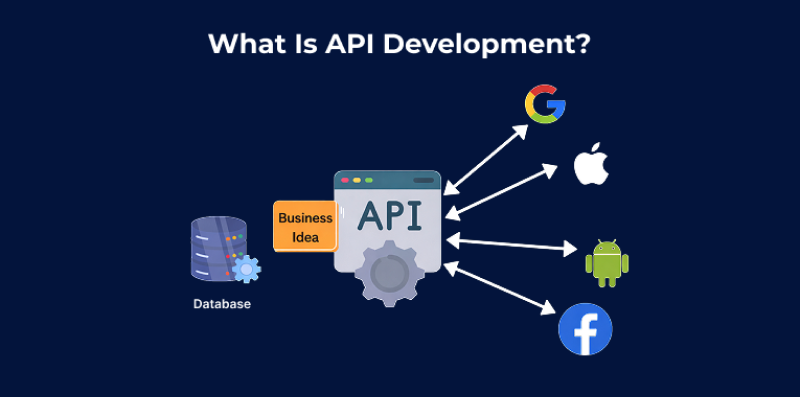
API development is the process of building a bridge that lets different software systems talk to each other. In simple terms, an API tells one app how to ask for data and how to receive it from another app.
For example, when a mobile app shows weather updates, makes online payments, or logs you in using Google, it is using APIs behind the scenes.
API development includes:
- Deciding what data or actions to share
- Creating clear rules for requests and responses
- Making sure it is secure, fast, and reliable
How Should You Design APIs That Actually Scale?

Good API development always starts with smart design. If you rush this step, your API may work today, but struggle tomorrow when users, data, or traffic increase.
Fixing those issues later usually costs more time and money. So it’s better to design things right from the beginning.
Let’s break this down simply and practically.
Step 1: Start With Clear Requirements and Business Goals
Before writing any code, be very clear about why your API exists. Ask yourself a few basic questions:
- Who will use this API? Your own team, partners, or the public?
- What problem does it solve?
- How will you know it’s successful?
In 2026, APIs are not just technical tools. They are business assets. A well-designed API can power mobile apps, websites, integrations, and even new revenue streams.
If you don’t understand the purpose clearly, you may end up building something that works technically but adds little real value.
Clear goals help you avoid overbuilding and keep your API focused.
Step 2: Choose the Right API Architecture Style
Once you’re clear on why your API exists, the next decision becomes much easier
Not all APIs are built the same. Choosing the right style makes a big difference in how well your API scales and how easy it is to use.
1. REST APIs
REST is the most common and easiest to understand. It uses simple HTTP actions like GET, POST, PUT, and DELETE. REST works best when:
- You are doing basic create, read, update, and delete operations
- You want simple caching
- You want broad developer support
This is why most web and mobile apps still use REST.
2. GraphQL
GraphQL is useful when different clients need different amounts of data. Instead of having many endpoints, it uses a single endpoint and allows clients to request exactly what they need.
It’s a good choice when:
- Mobile and web apps need different data
- Over-fetching data is a problem
- Developer experience is a priority
3. gRPC
gRPC is mostly used for internal systems talking to each other. It’s fast and efficient, but harder to debug and less readable by humans. It’s best when performance matters more than simplicity.
The key idea is simple: don’t choose a technology because it’s trendy. Choose what fits your use case.
Step 3: Design Clear & Predictable Endpoints
Your API’s endpoint structure is its user interface. In API development, clarity always beats cleverness.
Follow RESTful resource naming conventions:
- use nouns for resources (
/users,/products, not/getUsers), - create logical hierarchies (
/users/123/orders), - and keep URLs readable and predictable.
Avoid overly long or deeply nested URLs. If an endpoint becomes hard to read, it’s often a sign that the design needs simplifying.
Clear endpoints make APIs easier to use, maintain, and scale as more developers start using them.
Step 4: Plan for changes with Versioning
APIs change over time. New features come in, and some things need fixing. This is normal. That’s why versioning is critical.
Using versions like /v1/users and /v2/users allows you to improve your API without breaking existing users. Clients can move to newer versions when they are ready, instead of being forced into sudden changes.
A good versioning strategy:
- Protects existing users
- Makes upgrades predictable
- Allows your API to evolve safely
Versioning is not optional for scalable API development. It’s a safety net.
What Are the Essential Steps in Building Robust APIs?
Once your API design is clear, the next step is building it in a way that works reliably in real life. A strong API should stay stable under load, stay secure, and be easy for other developers to use and trust.
Here’s how to build APIs that actually hold up in the real world, explained in simple language.
1. Choose the Right Technology Stack
Your technology stack is the foundation of your API. Choosing the right tools makes development faster and maintenance easier.
Popular choices include:
- Node.js with Express for lightweight and flexible APIs
- Python with FastAPI for speed and automatic documentation
- Django REST Framework for feature-rich APIs
- Java with Spring Boot for large, enterprise systems
There is no “best” stack for everyone. The best choice depends on:
- What your team already knows
- How fast does your API need to be
- How complex your system is
Avoid choosing tools just because they are trending. Use technologies that our team can support long-term.
2. Add strong Authentication and Authorization
Security is not optional in API development. Every API request should answer two questions:
- Who is calling the API? (authentication)
- What are they allowed to do? (authorization)
Use trusted standards like:
- OAuth 2.0
- OpenID Connect
- JWT (JSON Web Tokens)
These systems are tested and widely used. They reduce the risk of security mistakes. Also, use role-based access control. This means different users get different permissions.
For example, a normal user should only see their own data, not everyone else’s. Always use HTTPS so data stays encrypted. Never send passwords or tokens in plain text.
3. Protect Your API With Rate Limiting
Rate limiting controls how many requests a user can make in a certain time.
Why this matters:
- Prevents abuse and attacks
- Protects your servers from overload
- Keeps the API fair for all users
For example:
- Free users: 100 requests per hour
- Paid users: 10,000 requests per hour
This not only improves stability but also supports paid plans if your API is monetized.
4. Handle Errors Clearly & Gracefully
Error handling separates professional API development from amateur work. When something goes wrong, your API should communicate clearly what happened and what the client should do about it.
Use appropriate HTTP status codes:
- 200–299 for success
- 400–499 for client mistakes
- 500–599 for server issues
Each status code serves a specific purpose. Provide detailed, meaningful error messages that help developers diagnose issues without exposing sensitive information about your system.
A well-designed error response includes:
- the status code,
- a human-readable message,
- and ideally a machine-readable error code for programmatic handling.
Consider including links to documentation or suggestions for fixing common errors.
How Do You Test APIs Effectively Before Deployment?
Building an API is not finished until you test it properly. If you skip testing, you risk broken features, slow performance, and unhappy users.
Testing helps you find problems early, before real users do.
1. Build a Simple but complete Testing plan
A good API should work correctly, stay fast under pressure, and stay secure. To make sure this happens, you need to test your API from different angles, not just one.
Think of testing like checking a house before moving in. You check the doors, electricity, water, and safety. APIs need the same kind of checks.
Test at different levels
- Unit Testing verifies that individual functions and methods work correctly in isolation. These tests run quickly and help catch logic errors early in API development. This is the first step. Here, you test small pieces of code one by one.
- Integration Testing ensures that different components of your API work together correctly. This is where you test that your API endpoints correctly interact with databases, external services, and other system components.
- Functional Testing validates that your API performs the right tasks – creating resources, retrieving data, updating records. This testing ensures your API meets its functional requirements.
- Performance Testing checks your API’s speed, response times, and load capacity. Use load testing tools like JMeter or Locust to simulate high traffic and observe how your API holds up. This can expose bottlenecks that you can then address before they impact real users.
- Security Testing identifies vulnerabilities such as injection flaws, broken authentication, and insecure communications. Tools like OWASP ZAP, Burp Suite, and Snyk help find security issues before attackers do.
2. Automate Testing in Your CI/CD Pipeline
Manual testing is slow and easy to miss. Automated testing runs your tests every time someone changes the code. This happens inside your CI/CD pipeline.
Benefits:
- Bugs are caught instantly
- Broken code never reaches production
- Development stays fast and stable
Run tests on every commit or pull request. This keeps your API reliable as it grows.
3. Test With Realistic Data
Fake data often hides real problems. Use realistic test data that mirrors production scenarios. This helps uncover issues related to data volume, character sets, and complex relationships that simple mock data might miss.
Populate your testing environment with data that reflects what your API will encounter in the real world.
What Should You Know About Deploying APIs to Production?
Deployment is the moment when theory ends, and real users show up. Most API problems don’t come from bad code. They come from poor deployment choices.
Here’s what actually helps.
Choose Hosting Based on Traffic
The biggest mistake teams make is picking tools because they’re popular, not because they fit the API.
- If your API serves steady traffic (dashboards, internal tools, partner integrations), Docker with Kubernetes is the safer choice.
You get predictable performance, easier debugging, and full control over updates. - If your API handles spikes (campaign traffic, mobile apps, event-based requests), serverless works better.
- It scales instantly and saves cost, but cold starts and limits can hurt performance if not planned.
Rule of thumb:
If downtime hurts revenue or users, avoid “experimenting” in production. Choose stability first.
Implement Proper Monitoring and Observability
You can’t improve what you can’t measure. Deploy monitoring from day one of your API development project.
Track key metrics like response times (measuring not just averages but percentiles like p95 and p99 to understand the worst-case experience), error rates (the percentage of requests returning 4xx/5xx status codes), throughput (requests per second), and endpoint coverage (what percentage of your API is being used).
Tools like Prometheus and Grafana for metrics, Datadog or New Relic for comprehensive observability, and ELK stack (Elasticsearch, Logstash, Kibana) for log management all have their place in production API development. Choose tools that fit your team’s skills and budget.
Mean Time to Detect (MTTD) and Mean Time to Resolve (MTTR) are vital KPIs for critical APIs in production environments. The faster you detect and resolve issues, the less impact on users.
Use API Gateways for Production Management
API gateways have seen a 45% adoption increase year-over-year for good reason. They provide a centralized point for managing API traffic, enforcing security protocols, implementing rate limiting, and monitoring usage.
Popular API gateways include Kong, Apigee, AWS API Gateway, Azure API Management, and Tyk. These platforms handle cross-cutting concerns so your API development can focus on business logic.
Final Thoughts
At the end of the day, API development is not about showing off smart skills or writing complex logic that only you understand. It is about making things work smoothly, even when users, apps, and systems show up all at once like uninvited guests.
A good API is like a good waiter. It listens carefully, brings the right response, and does not drop anything on the floor. Design it well, test it properly, and deploy it with care, and it will quietly do its job without waking you up at 3 AM.
So build APIs that are clear, reliable, and ready to grow. If your API can handle traffic without panicking, you are already doing better than most of us on a Monday morning.