
Software teams are under permanent pressure to not only work more quickly but also fix bugs promptly and even match new tools. The majority of developers are already using AI daily, considering AI Code Generator tools, as well as code assistants such as GitHub Copilot or Replit Ghostwriter.
AI isn’t some bonus anymore. It’s a real part of how modern software gets built through AI for software development.
Let’s break down how AI is being used, the real benefits it brings, and the key trends shaping how coding looks today.
How AI is shaping software development
AI is changing every step of how people write and manage code in AI for software development environments. Instead of typing out the same bits of code again and again, developers now use AI to handle the boring parts, generating templates, spotting errors, or even cleaning messy code during AI in Application Development workflows.
That means faster coding, fewer bugs, and more time to think about the fun stuff: building better products with AI for software development.
Here’s an example. Say a developer wants to build a login page. Instead of writing all the code for authentication, validation, and error handling, AI can spin out a base version instantly using an AI Code Generator.
Then the developer just tweaks it to fit the project. That saves hours and keeps things more consistent across teams.
AI also helps teams measure what really matters in AI for software development workflows. Before, success meant “how fast did we release?” Now it’s “how well are people working together?” or “is the AI helping us improve quality?”
AI adds another layer of insight: you can track not just speed but also how smoothly the whole machine runs.
Benefits of using AI for software development
The usefulness of AI is not only automation, but it is also a matter of smarter work. Coding becomes simplified, maintenance becomes less heavy, and decisions become more transparent when AI tools are introduced in the everyday routine of software development; these are the actual achievements of AI in software development and not just hype.
The practice would work out like this:
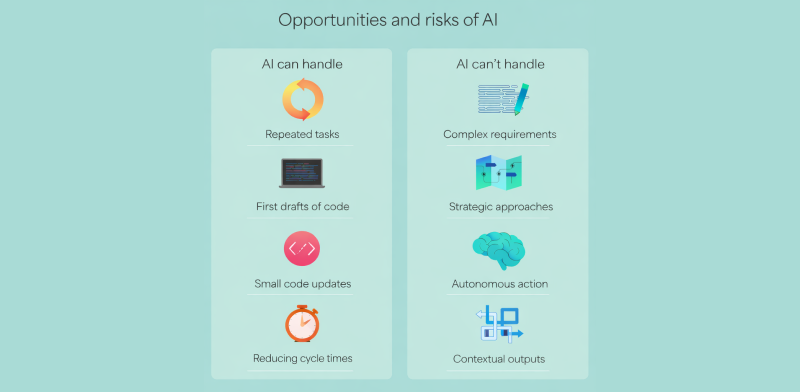
- Less repetition: AI can handle testing, debugging, and documenting in AI for software development workflows. You can spend your time building features, not fixing typos.
- Faster starts: AI generates first drafts of code, so setup time drops from hours to minutes, especially useful in modern AI in application development teams.
- Quick fixes: AI proposes minimal changes or enhancements directly in your code editor.
- Shorter build times: Predictive insights assist in identifying the slow spots in the build process before they turn into a blockage.
- Smarter feedback: AI can examine work patterns to advise developers to improve their performance in AI in software development teams.
You can imagine it as a co-pilot, who is not tired of it and does not get bored- it only assists you to move faster and cleaner.
How AI fits into the software development lifecycle
AI has its fingerprints on every step of a project, from idea to launch to updates in AI for software development. Let’s see what that looks like.
1. Ideas and planning
AI tools can take plain-text ideas or user stories and turn them into detailed project plans. It can suggest the best features to build first or predict problems that might come up later.
2. Design
AI can help design app layouts, user flows, and even color schemes that make sense. It can whip up mockups and wireframes so designers and developers get on the same page faster.
3. Coding and building
This is where AI shines. It helps generate code, spots issues in real time, and even explains what certain code does, all while developers focus on the bigger problems.
4. Testing
Instead of relying fully on humans to test everything, AI can create test cases, run them, find bugs, and learn from past fixes. That cuts testing time without cutting quality.
5. Deployment
AI predicts which releases might break and helps manage rollout timing. It keeps cloud environments stable and flags issues before they reach users.
6. Maintenance
Once an app is live, AI keeps an eye on its health. It detects glitches, suggests improvements, and sometimes even fixes issues automatically.
7. Documentation
The part everyone avoids, writing docs, AI now does that too. It explains how code works, updates API docs, and keeps everything clean and easy to read.
Key metrics to track with AI for software development
It is impossible to know whether AI is really helping unless you monitor the appropriate things. It is not only about code output, but also how your workflow is transformed.
Five basic measures that can demonstrate the actual effects of AI are as follows:
- Turnaround time for code reviews: The machines increase feedback rates, so the code is reviewed, approved, and merged much faster.
- Pull request (PR) size: Smaller, more frequent PRs indicate that AI assists teams to work in small digestible bites rather than in large and risky pushes.
- Feedback quality: In case AI does menial checks, human beings have the chance to put deeper and meaningful feedback- that is what resonates with real growth.
- Team contribution: AI can simplify the process of coding, not only for some individuals. It is a good indicator to spread our contributions among your staff.
- Cycle time stability: When AI is set up right, your delivery timeline stays steady, no last-minute chaos, no unpredictable outages.
Conclusion
AI isn’t replacing developers. It’s making their work cleaner, faster, and more creative. Whether you’re a solo coder or part of a huge dev team, the benefits of AI for software development are clear. Using AI tools isn’t a “someday” thing anymore; it’s how good software gets made today.